1 节点继承关系
2 脚本生命周期
- 创建节点
- 把节点加到树中
1 | extends Sprite2D |
3 监听键鼠输入
1 | extends Node2D |
4 资源网站
推荐几个国外比较好的资源网站,国内的资源网站现在还比较稀缺,需要科学上网
- Untiy Store ,最大的游戏资源网站,可以使用里面的2D图片资源
- craftpix ,国外的一家提供高品质的优质和免费的2D游戏资产的网站
- game dev market ,内容涉及2D、3D、音频和GUI素材,也可以作为一个寻找素材的补充
- kenney ,国外一家做游戏创意原型的资源站
- Fiverr ,一个综合的数字服务提供平台,可以直接在里面找到为我们工作的人,然后他们会提供一些我们定制的服务。
5 节点关系
根节点get_tree().root
查找子节点find_child(“xxxxxx”,true,false)
添加子节点xxxNode.add_child(node2D)
1 | extends Node2D |
获取子节点
var subNode1 = $SubNode2
var subNode2 = $”SubNode2”
获取当前节点
var currentNode1 = $”.”
var currentNode2 = self
获取父节点
var parentNode1 = get_parent()
var parentNode2 = $”../“
6 场景切换
1 | extends Node |
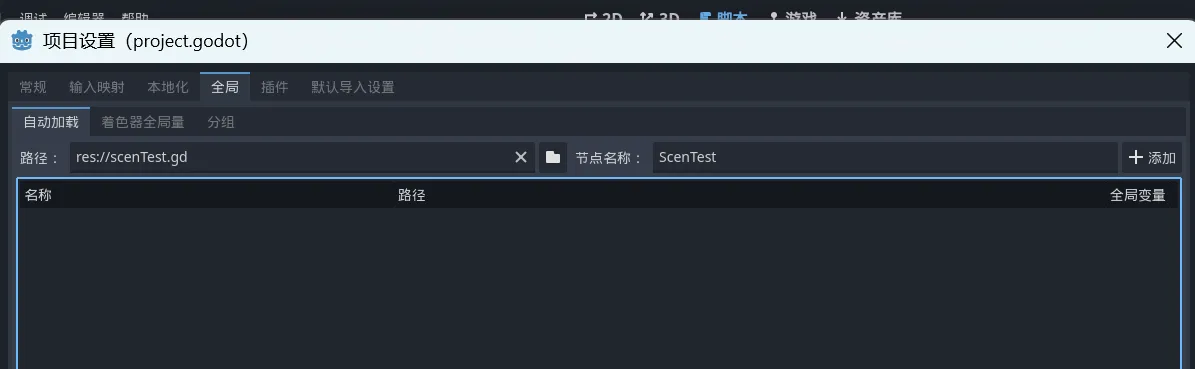
7 自动加载
很方便的做出一个,切换场景也不会被销毁的单例形式脚本
8 向量
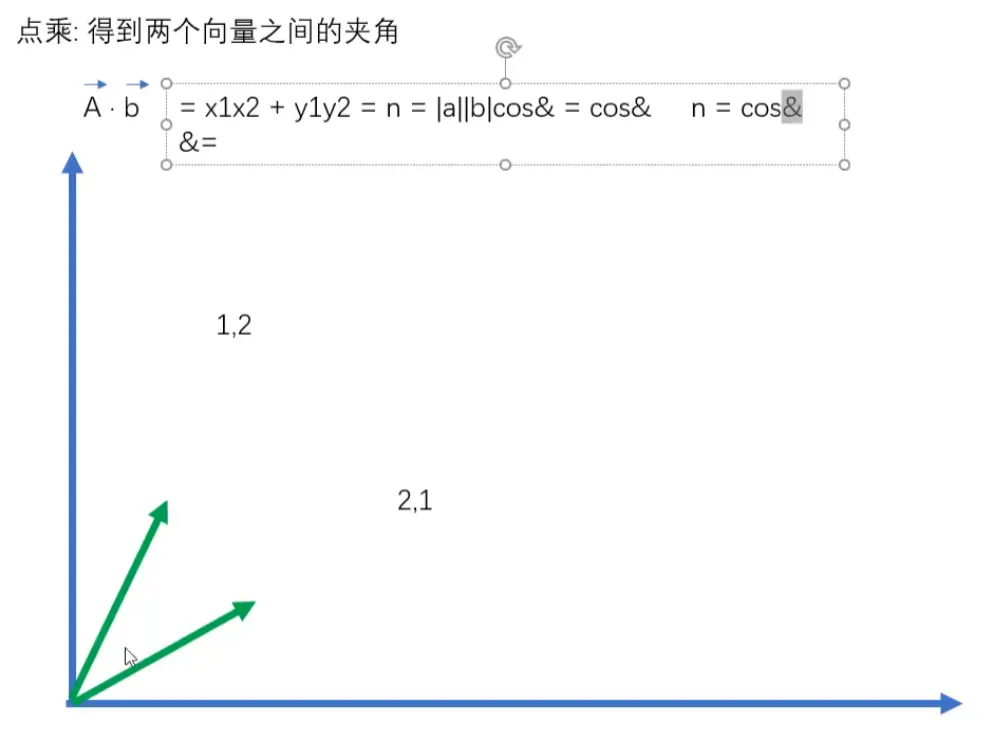
点乘的意义
9 节点的常用属性和方法
Node2D
canvasItem属性
z Index:越大越在上
略
10 用脚本修改节点
例1
1 | extends Sprite2D |
例2操作sprite
1 | extends Sprite2D |
11 物品分组
1 | extends Sprite2D |
12 自定义信号
//TODO跳过
13 动画
animatedSprite节点
播放多个图片形成动画
AnimationPlayer节点
功能更多
14 灯光&声音
阴影,遮罩
15 碰撞
16 射线形状检测
17 帧和物理帧
18 物理效果
19 角色控制
CharacterBody2D节点
UI
20 游戏界面基类 &图像&文字&按钮
锚点和轴心点
焦距
21 进度条&输入框
22 自动布局
23 2D相机
24 瓦片
25 2D寻路
26 粒子系统
27 存档
28 数据
29 网络
本博客所有文章除特别声明外,均采用 CC BY-NC-SA 4.0 许可协议。转载请注明来源 芃狐!
相关推荐
2024-05-14
Godot游戏开发日志-12
1 属性节点stats创建node2D节点stats,负责处理小怪属性 1234extends Node2D@export var max_health:int = 1@onready var health = max_health bat.gd,检测到碰撞,health值减1 1234func _on_hurtbox_area_entered(area):+ stats.health -= 1+ if stats.health <= 0:+ queue_free() 2 使用信号控制小怪消失为了更好的代码结构,加入信号,向下调用,向上信号,这样对象独立性更高,切记! stats.gd health被设置时,对应的set函数会被自动调用,可以借此自动发送信号 自动发送信号, 123456789101112extends Node2D@export var max_health:int = 1+- @onready var health = max_health:set=set_health+ signal...
2024-01-30
Godot游戏开发日志-1
效果预览 1 开发前的准备1 默认渲染设置因为是像素风,需要调整默认渲染设置:Nearest 2 运行窗口大小设置推荐的像素游戏窗口大小: 320 x 180 3 开发窗口大小设置此时开发时的窗口大小,跟随着上一步;如果不单独设置,就是上一步设置的、运行窗口大小,开发的时候根本看不清,所以打开高级设置,开启窗口高度覆盖 4 拉伸模式设置重新运行,发现只有运行窗口变大了,图片素材还是原大小,设置拉伸模式,使图片大小自适应拉伸 2 创建玩家1 前言:Godot中有3种物理物体 1 StaticBody2D适用于无法被外力移动的 2D 物理物体。手动移动时不会影响路径上的其他物体。 2 RigidBody2D适用于由物理仿真进行移动的 2D 物理体。 3 CharacterBody2D(3.x版本叫KinematicBody2D) 用作玩家节点,选用CharacterBody2D,官方给出的介绍如下: 2...
2024-02-02
Godot游戏开发日志-2
效果预览 1 添加人物碰撞在play节点下新建一个collisionShape2D节点,选择shape添加碰撞检测的形状,这里添加椭圆形,并旋转90°(按自己喜好设置) 调整形状,把脚盖住 2 添加空气墙测试人物碰撞添加StaticBody2D节点,和它的CollisionPolygon2D子节点,绘制墙体,在调试中把显示碰撞区域打开 3 处理挨着墙壁移动,角色会抖动的问题使用move_and_slide()替换move_and_collide(velocity * delta) 完整代码 123456789101112131415161718192021222324extends CharacterBody2Dconst ACCELERATION = 15 * 60const MAX_SPEED = 100const FRICTION = 10 * 60var input_vector = Vector2.ZEROfunc _physics_process(delta: float) -> void: #...
2024-02-02
Godot游戏开发日志-3
效果预览 1 将Play节点提取为场景在Player节点上右键,另存为场景,存放在Player文件夹里,方便后面复用 另外,注意把Transform设置为(0,0),这样才能使位置保持在中心位置。 2 Tree节点重构为场景1 先在Word场景下,删除之前的Tree节点 2 新建一个StaticBody2D节点,命名为Tree 3 在Tree节点下添加sprite2D子节点,用于给Tree节点赋值图片 4 给sprite2D节点添加图片素材 5 给Tree添加CollisionShape2D和Shape形状 6 保存场景到文件夹World目录下 3 在word中添加bush场景 现在就可以删除之前在world场景下创建的测试用的staticbody,将Tree节点随意拖入world场景 3...
2024-02-02
Godot游戏开发日志-4
1 准备精灵图如果素材精灵图是上节那种没对齐的,那就需要自己手动处理,见站内文章//TODO使用aseprite处理不规则精灵图,处理好的精灵图如下 替换之前的player.png 2 制作奔跑和休息动画使用AnimationPlayer节点制作4个方向的奔跑和休息动画,效果展示: 体会一下加载后自动播放和循环播放这两个功能,后面会用到 3 脚本逻辑 首先,得在初始化好之后才能访问AnimationPlayer节点,使用@onready 1@onready var animation_player: AnimationPlayer = $AnimationPlayer 移动的时候播放RunXXX动画,否则播放IdleXXX动画 使用play方法播放动画 12345if input_vector != Vector2.ZERO: animation_player.play("RunRight") ......else...
2024-02-03
Godot游戏开发日志-5
1 使用动画树状态机处理4方向动画的混合位置创建动画树节点AnimationTree,绑定上节创建的动画节点 指定动画树结构,这里用状态机 AnimationNodeStateMachine 新建混合节点 BlendSpace2D ,用来管理休息动画,记得把混合模式改为虚线的 连续:每帧都更新属性。 离散:仅在位于关键帧时更新属性。 捕获:如果第一个关键帧的时间大于 0.0,就会记录该属性的当前值,并将其与第一个动画帧混合。例如,利用“捕获”模式,你可以将处于任意位置的节点移动到特定的位置。 中心点位置记得归零,同样的方法制作Run的混合位置,并和Idle节点、Start节点连接。 注意:Start的mode是Auto,动画直接是Enabled。 2 更新Play脚本控制动画播放 访问动画树 1@onready var animation_tree: AnimationTree =...